Some Raspberry Pi modles have Bluetooth and 2.4 / 5 GHz 802.11ac WiFi built in or can use a USB dongle for WiFi and Bluetooth.
Raspberry Pi and many other embedded single board computers can connect to the internet via Bluetooth WPAN a.k.a. tethering or connection sharing.
This method avoids tying up the WiFi connection of a phone, or putting sensitive WiFi credentials on an embedded device.
This method inherently limits internet bandwidth to the embedded device to about 1.6 Mbps practical throughput due to the legacy Bluetooth WPAN specification.
NetworkManager can be used from the command line “nmcli” to make the Bluetooth internet connection.
Create a script and “@reboot” cron job to make a semi-permanent WPAN connection.
Connect to the internet host device e.g. smartphone with
Bluetooth tethering turned on
Bluetooth UUID like:
nmcli device connect AA:BB:CC:DD:EE:FF
It’s also possible to configure USB tethering to the phone; I’ve done that via the NetworkManager GUI from the desktop environment.
BlueZ5 allows using Bluetooth on Linux for useful tasks like:
playing sound from the Linux device over Bluetooth headphones
send text with Android phones
This works for Linux computers in general, from laptops to Raspberry Pi or other single board computers with Bluetooth on-board or via USB adapter.
BlueZ is very handy for command line Bluetooth on Linux:
apt install bluez5
From any Linux computer with Bluetooth, pair the Bluetooth device from Terminal:
Hardware enable Bluetooth adapter
rfkill unblock bluetooth
start HCI UART service
systemctl start hciuart
Go into Bluetooth interactive mode. Use sudo if “no default controller available” error occurs.
bluetoothctl
shows a list of devices already paired, and goes into an interactive Bluez program.
show Bluetooth adapters usable (there must be at least one).
list
software enable Bluetooth adapter
power on
agent on
Find Bluetooth devices to pair with
scan on
A list of Bluetooth pairing-mode UUIDs stream in continuously.
Wait several seconds if you don’t immediately see your device.
Be sure the device (e.g. smartphone/laptop) is in visible/pairing mode.
Stop the scan:
scan off
Pair with Bluetooth device, where uuid is your device
pair uuid

trust uuid
Connect to the Bluetooth device:
connect uuid
bluetoothctl commands: from within bluetoothctl interactive prompt.
paired-devices: list devices this computer is paired with
info UUID: for device with UUID, list capabilities (Bluetooth service profiles).
For example, PANU is PAN user.
Here are several basic Bluetooth commands from the Linux terminal.
List installed Bluetooth devices from Linux:
rfkill list
The listing will look like:
0: phy0 Bluetooth: bluetooth
Soft blocked: yes
Hard blocked: no
enable Bluetooth devices:
rfkill unblock bluetooth
Which reveals another device:
1: hci0: bluetooth
Soft blocked: no
Hard blocked: no
Pytest cleanly handles many continuous integration issues.
Pytest is worthwhile to setup tests and improve test coverage.
It’s straightforward to incrementally upgrade from obsolete nose and legacy unittest modules to Pytest.
A frequent CI task is comparing floating point numbers.
Computer representations of floating point numbers have
finite precision.
Real numbers associativity doesn’t completely apply to digital floating point representations.
A practical solution to this problem is to compare numbers (scalars or arrays) to within an absolute and relative tolerance.
Widely known functions exist to compare “equality” of floating point numbers in
Python
and
Fortran real/assert.F90
among other numerical languages.
pytest.approx
provides a syntactically clean approach that may be more intuitive and readable for CI applications.
It works with scalars and arrays of all sorts including the ubiquitous numpy.ndarray.
pytest.approx() can be used to compare Numpy ndarrays, lists, tuples, and scalars.
However, for Numpy ndarrays, a richer feature set and text output is available with numpy.testing.assert_allclose().
importnumpyasnpfrompytestimport approx
deftest_mynums():
x = np.array([2.00000000001, 1.99999999999])
assert x == approx(2.)
# or np.testing.assert_allclose(x, 2.)
NaN is an unrepresentable, undefined quantity as results from invalid computations like:
∞ / ∞
0 / 0
NaN are also useful as sentinel values to indicate a problem with a computation for example.
Python sentinel
values include NaN and None.
In Julia, performance is approximately the same for nan vs. nothing sentinel values.
The option pytest.approx(nan_ok=True) allows one or more NaN’s in the test array.
Absolute and relative tolerance are important considerations for CI, particularly across OS and computer types, where order of operation and numerical CPU/GPU/APU/etc. tolerances and low level math routines (BLAS, AVX, etc.) differ.
Especially (perhaps obviously) for single precision arithmetic vs. double precision arithmetic, tolerances will be larger.
pytest.approx() default tolerances work for many situations.
Absolute tolerance shouldn’t be 0 to avoid unexpected effects near 0.
Depending on the parameter, rel=1e-4 may be more appropriate for CI tests that need to work on a variety of systems.
DO NOT USE -ac 1 even with monaural audio as you’ll get lots of errors like
non-monotonous DTS in output stream 0:1;
-c:a libmp3lame -ar 44100
encode audio as MP3 with a 44.1 kHz sampling frequency (passing audio up to about 22 kHz, which is CD-quality).
List PulseAudio devices:
pactl list sources
Control audio sources with:
pavucontrol
Video config -framerate 10 -f x11grab -i :0.0+0,0 screengrab at 10 fps, starting in the upper left hand corner, send a 1024x720 pixel video.
If your screen resolution is more than 1024x720, there would be unsent regions at the bottom and/or right side.
Bluetooth speakers can easily be used with the Raspberry Pi and other Linux single-board embedded computers to wirelessly play sound.
After
connecting to Bluetooth device from Linux terminal,
setup BlueZ like:
apt install bluez
Then setup Alsa or Pulseaudio to use the Bluetooth audio device, whether by GUI or command line.
We develop and deploy data collection from remote, inaccessible sites located around the world.
Thus we need to have highly-reliable methods of remote control.
This is accomplished in part by Intel vPro enabled computers, allowing remote power down, reboot, and even reinstall the operating system remotely from a HTTP vPro internal webserver.
Remote PC control checklist:
Intel vPro motherboard
Certificates to control vPro (don’t rely on passwords for full PC control!)
Clonezilla DVD in DVD drive
Clonezilla HDD image on Blu-ray in drive or USB HDD / flash drive
Hardware Firewall to not expose vPro ports to outside world.
Commercial remote desktop: SSH port forwarding and RDP, but what about those who want to use LogMeIn or the like?
Pros:
Commercial remote desktop services such as LogMeIn are typically more secure on a Windows PC than just leaving port 3389 open to the internet.
LogMeIn has convenient apps for smartphones and from a web browser
Cons:
The downsides of LogMeIn-type commercial services have philosophical and practical aspects.
Commercial services typically use proprietary (non-open-source) technologies for the central server and/or securing the connection. Open source choices are using perhaps the same technology but open to world-wide security reviewers.
The convenience of commercial services (centralized server making the connections) is seen by some as a weakness, since it could have unknown hackers as employees, could shut down their server, raise prices, etc.
Free alternatives:
SSH → RDP: Cygwin OpenSSH server SSH port forward port 3389
conda and pip are not merely two different ways to install Python packages.
Conda can install compilers such as gfortran.
Here are a few factors on where conda or pip have respective advantages.
This article defines “cross-platform”: working on Linux, macOS and Windows
Ease of install: Python
wheels
greatly ease end-user install of libraries requiring compilation without the end-user needing a compiler.
For example, high-performance Fortran, C and/or C++ code can be imported as a Python module, compiled beforehand and downloaded automatically.
However, major packages like
SciPy released cross-platform wheels
only in late 2017 (SciPy 1.0.0).
This means until 2017, easily installable, pre-compiled SciPy was not universal–some users would have to have Fortran, C and C++ compilers installed.
For a large subset of Python users, compiling software libraries is not intuitive and end users disliked waiting 10 minutes for SciPy to compile itself.
A core design reason behind conda is excellent conflict resolution, so I often type conda install when I want to install something complicated like Spyder.
The first-class conflict resolution of conda is matched by excellent virtual environment management.
conda env list
lists all the environments installed.
This allows you to safely try out complicated programs like Mayavi with lots of prerequisite packages.
Instead of ripping out the latest libraries you have, create Python environments with
conda create
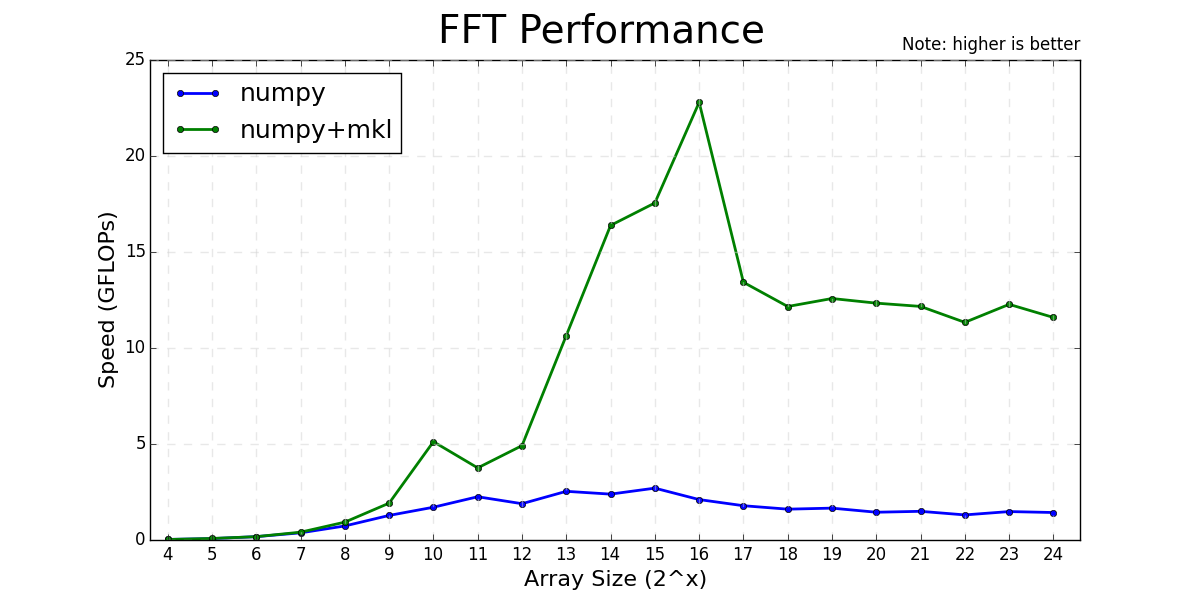
High performance MKL Python libraries:
Python Intel MKL FFT benchmark.
pip install scipy
downloads and immediately makes available precompiled Fortran, C, C++ libraries within SciPy.
Python wheels do not obviate Conda’s usefulness!
One of the key advantages of using conda-installed packages are the free
high-performanceAnaconda MKL libraries,
freely available since February 2016 for:
Typically the terminal/command prompt is 80 or 100 characters wide.
The advantage of this method is that previous information is not scrolled off the screen.
One common use for this method is terminal text progress indicators.
Using special characters, pseudo-graphical dynamic terminal displays are also possible, or use Python
curses.
Here’s an example:
fromtimeimport sleep
N=12for i inrange(N):
sleep(0.5)
print(f"{i/N*100:.1f} %", end="\r")
One cannot create an actual new terminal session windows from curses.
curses.newwin() “new window” is inside the “screen”, which is the existing Terminal.