Find the MAC address of a Bluetooth device in Windows from Windows Device Manager under Bluetooth, (select device in list), Properties, Details, Bluetooth Device Address.
List all Bluetooth devices and their MAC addresses from PowerShell:
The standard
git bisect
command helps quickly identify a specific commit that introduced a bug in a Git repository.
In projects where branches with lots of commits were previously merged, there may be known-bad commits with build failure unrelated to the current bisect search.
It’s possible to
skip
such commits during the bisect process, or
avoid
specific commits altogether.
For projects using Git submodules it’s useful to set option
submodules.recursetrue
git config --global submodule.recurse true
that works for most Git commands and avoids the need during “git bisect” to also have to “git submodule update –init –recursive” at each step of the bisect process.
git bisect start
# if you already know this current commit is good or bad, tell Git about itgit bisect <good|bad> <commit>
# test the current commit by running your test code / program / scriptgit bisect run <test command>
# ... repeat the above two steps until Git finds the first bad commit# finish the bisect process and return to the original branchgit bisect reset
Certain Cobra CB radios starting in the late 1990s including the Cobra 75 WX ST have a
compandor
circuit known as “SoundTracker” to reduce noise.
The IC used for the SoundTracker included the TA31101AF, which is a generic audio compandor IC used in various radio communication devices.
Compandoring compresses the dynamic range of an audio signal before transmission and expands it back to its original range upon reception, typically with a frequency vs. amplitude response curve tuned for the communication mode of the radio (say FM cordless phone vs. AM CB radio).
Compandoring helps improve apparent audio SNR, but it can introduce artifacts, especially when only one side uses companding.
Field experience indicates that SoundTracker can improve intelligibility for weak to moderate signals, including with non-SoundTracker radios, while adding a “huffy” character to recovered audio in some cases.
Reported improvement can be up to about 20 dB when both sides enable SoundTracker, and up to about 10 dB when only one side enables it; artifacts are usually more noticeable in one-sided use.
The digital noise reduction (DNR) circuit in the modern Cobra 75 All Road is generally superior to SoundTracker and avoids those specific compandor artifacts.
For the 2000s-era
Cobra 75 WX ST,
transmit modulation is high-level (yielding better sound quality and punchiness vs. low-level modulation of less expensive radios) and the radio includes an automatic noise limiter (ANL).
Internal adjustments in the Cobra 75 WX ST allow optimizing transmit carrier power, modulation limiting, and other parameters.
After two decades, the cord covering may crack and fall off, revealing the wires and antenna coax inside.
In contrast to the modern Cobra 75 All Road, the 75 WX ST has all the RF hardware in the microphone, with the small gray box being an interface to the antenna, power, and speaker jack.
The 75 WX ST is a good spare radio, but if purchasing a radio, consider instead a modern radio with DNR instead of SoundTracker, as the DNR is superior to the compandor.
TeXstudio and VS Code are among the IDEs that support remote collaborative code / document editing with real-time updates.
The program
Teamtype
is free, open-source, serverless, peer-to-peer, non-AI tech that enables no-cost real-time collaboration.
2 or more users connect via a Teamtype shared link code - no account or signup is used.
Git can be used to capture specific versions or milestones of the LaTeX document.
For general code editing and development with VS Code, Teamtype is also supported.
Overleaf has progressively added restrictions to its free plan, making TeXstudio (or VS Code)with Teamtype a good alternative for collaborative LaTeX editing.
To have essential security features with an on-premises instantiation of open-source
Overleaf Community Edition,
a paid Overleaf Pro plan is required.
Alternatives:
server-based collaborative team editing is possible with VS Code Live Share.
Crixet has an appealing free plan, watch to see how the features evolve vs. pricing
Papeeria free version is quite restrictive, only 1 private project
Scienhub free version lacks Git integration and has limited storage
Since 1972, standard VHF AM used 25 kHz channel spacing generally worldwide.
In 1999, European regulations began a mandatory phase-in of 8.33 kHz channel spacing for VHF AM aviation communications to increase the number of available channels.
The rest of the world generally remains on 25 kHz spacing for aviation.
One factor driving the 8.33 kHz spacing in Europe was the number of relatively close proximity airports and large number of small nations each having their own aviation communication needs.
Other countries like China and the United States also have regions with many airports and a lot of air traffic, but each have a unified regulatory framework managing all VHF airband communications.
Anyone who has used AM CB radio or AM broadcast radio would understand why 25 kHz channel spacing is reasonable to avoid adjacent channel interference with real-world AM transmitters and receivers in most reasonable proximities.
Even without overmodulated, splattering transmitters, an AM receiver can experience noticeable adjacent channel interference when within about 1 km of another AM transmitter operating on a channel just 10 kHz away.
If the CB radio transmitter is operating properly, 20 kHz spacing is adequate when not closer than about 1 km.
This observation can be loosely derived from a typical AM CB radio (say the Cobra 19 mini) receiver’s selectivity performance of say 6 dB at 7 kHz spacing and 60 dB at 10 kHz spacing.
Consider also the dynamic range of the receiver, akin to
Sherwood Engineering’s Receiver test data,
which doesn’t include CB radios.
Assume the CB radio transmitter ERP is 36 dBm (4 watts) and the receiver sensitivity for 20 dB SINAD is -113 dBm (0.5 µV).
At 1 km distance, free-space path loss at 27 MHz is about 61 dB.
This first order approximation neglects important factors like radiation pattern distortion from ground reflections.
Assuming 0 dB receiver antenna gain, received signal strength would be about -25 dBm, which can exceed the maximum dynamic range of the receiver front end, if we arbitrarily assume a receiver
dynamic range
of about 80 dB.
However, the typical
environmental noise floor
on 27 MHz - neglecting skip or other anthropogenic interference - may be ~ -110 dBm in the AM receiver bandwidth, so the dynamic range impacts of a legal CB radio transmitter 1 km away may not be noticeable.
An adjacent channel signal 10 kHz away (neglecting modulation bandwidth) would be attenuated by about 60 dB, resulting in a received adjacent channel signal strength of about -85 dBm.
The adjacent channel signal would be strong enough to cause noticeable interference on the desired channel, and unwantedly open the squelch if no desired signal is present.
With 20 kHz spacing, the adjacent channel signal would be attenuated by over 80 dB, approaching the general receiver’s dynamic range limit vs. the noise floor, and would be much less likely to cause noticeable interference, assuming the transmitter is clean.
The emissions mask in FCC part 95.979 requires better than -35 dBc in the band 8 kHz to 10 kHz from the carrier, and better than -59 dBc beyond 10 kHz from the carrier.
The radio transmitter will often do better than -59 dBc at 20 kHz from the carrier and increasingly better beyond that.
Switching to AM VHF airband radio, a typical installed receiver such as the Icom IC-A220 has receiver selectivity at the 25 kHz step of 6 dB at 3 kHz spacing and 60 dB at 22 kHz spacing, and at the 8.33 kHz step of 6 dB at 2.8 kHz spacing and 60 dB at 7.4 kHz spacing.
A typical handheld airband transceiver such as the Yaesu FTA-250L RX has selectivity in the 25 kHz step of 6dB at 8 kHz spacing and 60 dB at 25 kHz spacing, and at the 8.33 kHz step of 6dB at 2.8 kHz spacing and 60 dB at 8.3 kHz spacing.
Thus we see how at airband, where the frequency plans would be made to slice up former 25 kHz step frequencies into distant frequency reuse at 8.33 kHz step, while avoiding close-by overload, the 8.33 kHz step is quite useful.
To put this back into CB radio terms, suppose CB radio is popular in a town.
The typical use I’ve seen is for local groups to be at least 20 kHz apart to avoid adjacent channel interference.
For example, CB channel 20 (27.205 MHz) is more popular as a “local” channel than channel 18 (27.175 MHz) to avoid adjacent channel interference to/from channel 19 (27.185 MHz).
Since CB radio use by definition is entirely ad hoc, users generally space themselves 2 channels (20 kHz) apart in real-world observations.
For airband VHF AM in Europe, channels of 8.33 kHz spacing are successfully used with proper frequency planning considering physical separation to avoid adjacent channel interference and overload.
Given the above, I think President should have make like 8
P-channels
and not have had “P4” as CB channel 18.
They should have instead done like P1 = CB1, P2 = CB3, P3 = CB12, P4 = CB14, P5 = CB22, P6 = CB23, P7 = CB27, P8 = CB29.
This avoids CB channels 6, 9, 16 (SSB use), 19, and 20 and the SSB channels 30-40.
However those are only hypothetical channel assignments, and President did not in fact do that.
Given the existing President P-channel assignments, I think President should consider adding P6-P9 like:
P6 = CB14, P7 = CB22, P8 = CB23, P9 = CB27.
Again that’s hypothetical.
Zello
and
Motorola Wave
are two popular PTT (push to talk) instant group voice communications apps.
These apps are used by neighborhood watch groups, citizen rescue groups, and more.
Note that these apps require internet connectivity via cellular or WiFi.
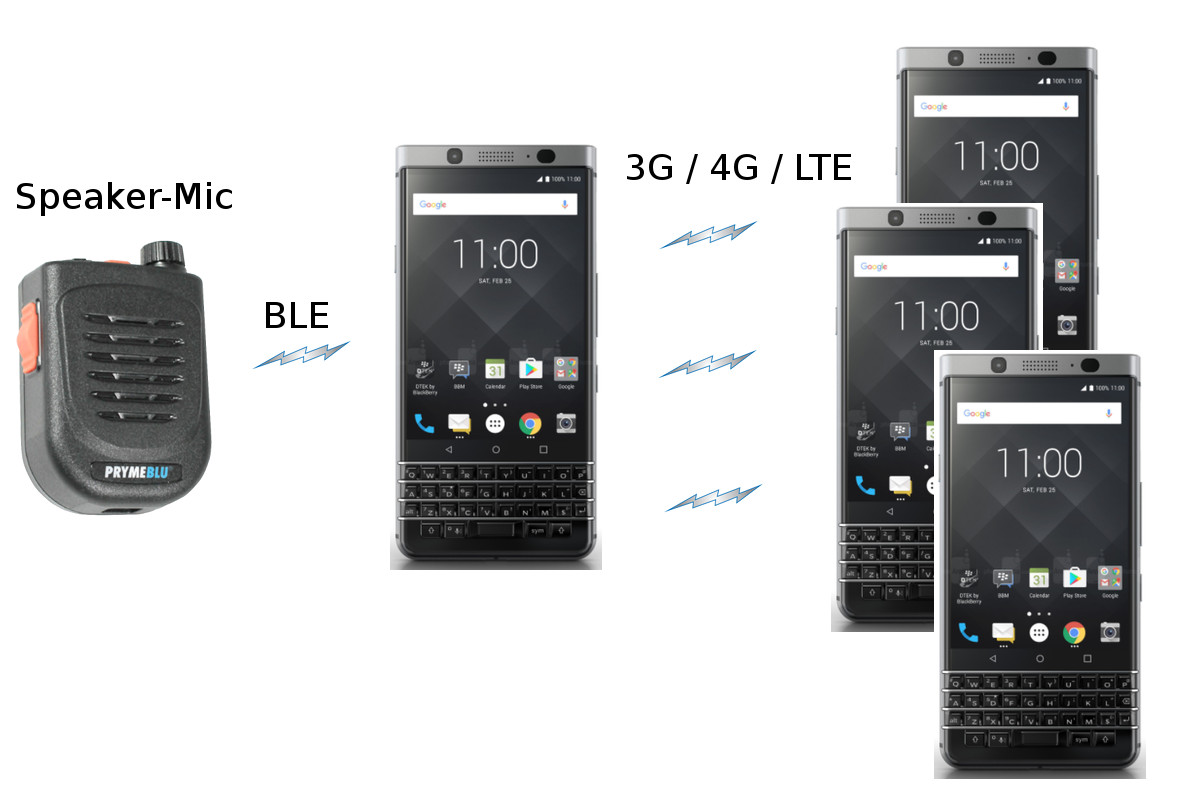
To make group voice PTT apps more convenient, consider a speaker-mic with PTT button to hear much louder audio than with the cell phone.
The key advantage of speaker mics include loud audio output and not needing to fumble around with a phone or radio in the hand, perhaps clipping the speaker-mic to one’s outer garment.
The speaker is several times larger than the internal smartphone speaker, meaning the fidelity and sound level can be much improved.
Pryme Radio Products makes several models of Bluetooth
PrymeMAX PTT phone speaker mics.
Most Bluetooth Speaker-Mics are “open”, meaning they can work with any app suited to accept them.
However, some Bluetooth Speaker-Mic are “proprietary”, meaning they work only with their specific app.
The problem with proprietary Speaker-Mics is that if the manufacturer goes away, you lose service.
Consider a speaker-mic with rotary volume control as it allows changing volume with gloves or inside a pocket without looking at it.
Among the key specifications to consider are speaker output (should be at least 1 watt) and battery life.
Public safety and critical infrastructure may use MCPTT (Mission Critical Push to Talk) solutions over 5G networks, in contrast to the PTToC used for commercial and personal applications.
These work at a lower network layer than typical apps like Zello and Wave.
The Open Mobile Alliance help define specifications for release as ETSI standards that network carriers and OEMs (infrastructure and devices) can comply with.
MCPTT works at a lower network layer to provide QoS and prioritization with high reliability.
This may also includes “talkaround” via
5G sidelink,
where devices can communicate directly without other wireless infrastructure.
These capabilities are NOT directly present in Wave, Zello and similar apps freely available.
For Bluetooth speaker mics that connect to traditional walkie-talkies, note that some radio manufacturers have proprietary Bluetooth aspects that make generic Bluetooth Speaker-Mics incompatible.
In those cases, an external radio Bluetooth adapter like PrymeBlu may be needed to make the connection.
On macOS when using the default “AppleClang” compiler in a Fortran project where GFortran objects are linked with C / C++ AppleClang objects, the ld linker may emit warnings like:
ld: warning: could not create compact unwind for ...: register .. saved somewhere other than in frame
ld: warning: could not create compact unwind for ...: registers .. and .. not saved contiguously in frame
This is an actual issue because C++ exception handling will not completely work when this warning is emitted from C++ code coupled with Fortran code.
In general, using C++ exception handling within C++ code that is linked with Fortran code will work just fine, except when this warning is issued.
The solution is to use GNU GCC C++ compiler with GFortran instead of mixing AppleClang with GFortran.
Specifying environment variable:
LDFLAGS="$LDFLAGS -Wl,-no_compact_unwind"
removes the warning, but this also disables C++ exception handling so it is not recommended.
if(NOTDEFINEDok_compile)message(CHECK_START"Checking for C++ exception handling with Fortran")try_compile(ok_compilePROJECTexception_checkSOURCE_DIR ${CMAKE_CURRENT_LIST_DIR}/exception_checkCMAKE_FLAGS-DCMAKE_LINK_WARNING_AS_ERROR:BOOL=onOUTPUT_VARIABLE_out)# _out is used for CMake < 4.0
if(NOTok_compileOR_outMATCHES"ld: warning: could not create compact unwind for")message(CHECK_FAIL"C++ exception handling will not work reliably due to incompatible compilers:
C++ compiler ${CMAKE_CXX_COMPILER_ID} ${CMAKE_CXX_COMPILER_VERSION}
Fortran compiler ${CMAKE_Fortran_COMPILER_ID} ${CMAKE_Fortran_COMPILER_VERSION}" )else()message(CHECK_PASS"OK")endif()endif()
Google Fi is a 5G MVNO optionally using WiFi UMA for calling and data.
Google Fi works with
most phones.
Optional
AI-enhanced audio
that works on most phones can sound dramatically better on phone calls.
Currently Google Fi uses
T-Mobile network coverage.
T-Mobile currently has arguably the best coverage vs. speed in much of the USA.
Google Fi does not seem to
exaggerate coverage area
as the FCC had found for
some carriers.
As usual, coverage is for ideal standing outside use.
Zoom in to see more detail in the coverage data.
To significantly enhance mobile coverage in car in general (not just for Fi) requires a bidirectional amplifier as available from Wilson Amplifiers / WeBoost, costing several hundred dollars and requiring an outside antenna mount.
Inexpensive integrated circuits like the On Semiconductor SA572 can be used for compandored audio.
Compandored audio increases the perceived SNR by greatly reducing audio gain for signals below a threshold, and greatly increasing gain for signals above that threshold.
It could be of interest to amateur radio operators to have such a circuit for noisy HF SSB / AM / FM.
CB radios before digital NRC features used compandoring e.g. Cobra SoundTracker or Realistic “Audio Clarity Enhancer”.
Narrowband FM two-way radios (2 kHz maximum deviation) often use compandoring to improve the audio quality.
Note that compandoring has a downside – when communicating with non-compandored stations, the audio may sound unnatural.
Even communicating with another compandored station may sound odd if the settings are not matched well.
Compandoring has fallen a bit out of favor due to DSP-based noise reduction (NRC) generally doing a better job of improving apparent SNR with fewer audio artifacts vs. compandoring.
A compandor IC such as used in commercial two-way radio can improve the apparent audio SNR of analog voice communications, whether AM / FM / SSB.
The circuit thresholds and compresses transmitted audio, in a better fashion than the simpler clipping circuits sometimes used in ham radio.
The circuit also has the capacity to “expand” the receive audio when the transmitting station is transmitting “compressed” audio.
The apparent SNR increase can be on the order of 20 dB if the transmit and receiver compandoring settings are matched.
Note that this apparent increase is caused by increasing the average power of the transmission; peak power is still limited by the radio.
The compandor IC SA572NG is available from
Mouser
for $2.
It needs a few common resistors and capacitors external to the IC as well.
The
Wouxun KG-S72C
is a handheld CB radio with AM and FM.
Having both AM and FM is recommended for anyone buying a CB radio.
FM provides improved sound quality and improved range over AM, when talking with others capable of FM.
The KG-S72C has CTCSS and DCS
coded squelch
for FM, which allows hearing only transmissions with a matching subaudible code.
The sound quality on receive and transmit is good for AM and FM.
The superheterodyne receiver is sensitive and selective.
To get reasonable performance from the factory antenna, have the radio sitting on a metal object or held by hand.
Since the President
Randy III FCC TXUS722
has come to market, we generally recommend the Randy III FCC over the KG-S72C.
Only buy the KG-S72C if you are on a tight budget and can accept its cons.
The Randy III FCC can do everything the KG-S72C can do and adds important features over the KG-S72C.
The KG-S72C uses an SMA female antenna (the radio has the usual SMA male connector).
Use caution regarding long attached antennas like tactical folding antennas or telescoping antennas, as they may excessively strain the SMA connector on the KG-S72C.
The Hyshikra “XP-70 SMA” (be careful as they also make the “XP-70 BNC”) 16 inch (41 cm) antenna yields several dB of improvement over the factory antenna, which is a significant improvement in transmit and receive range.
I have not found anyone, including Wouxun, that sells the exact KG-S72C factory antenna replacement.
A replacement antenna like the Hyshikra is an improvement over the factory antenna.
The PresidentRandy III FCC is a more usable CB radio and a better value than the KG-S72C.
The Randy TNC antenna connector is more mechanically robust for handheld antennas than the KG-S72C SMA connector, given the length and bulk of antennas necessary at 27 MHz.
Randy III FCC has NRC Noise Reduction, which is quite important on any CB radio to reduce listening fatigue, while the KG-S72C does not have NRC.
Randy has RF level squelch and auto-squelch, while the KG-S72C only has auto-squelch.
Randy has 4 watt carrier power on AM, while KG-S72C has 2 watt carrier power on AM. Both have 4 watt carrier power on FM.
For reference, the Wouxun “KG-S” series of handheld radios with superheterodyne receivers is also available in VHF aviation-band models (6 watt AM carrier) and UHF FM models.