It’s a good idea to breakup project code into distinct subdirectories.
It can be useful to have a CMakeLists.txt for each of these directories that are included from the top-level CMakeLists.txt.
Assume a C project with subdirectory io/ and top-level CMakeLists.txt:
Build a little test script in io/ directory to test just HDF5 I/O,
and compile the whole program from the top level directory, then test the main program and subdirectory libraries:
ctest --test-dir build -V
CMake Directory variables: to refer to the parent project directory use ${PROJECT_SOURCE_DIR}.
If using nested projects, ${CMAKE_SOURCE_DIR} refers to the highest level CMakeLists.txt directory
Edit all CMakeLists.txt recursively: on Linux / Unix systems, edit all CMakeLists.txt in a project with a command like
Array broadcasting (no bsxfun() needed) is in
Matlab
and
GNU Octave
Array broadcasting can minimize copying of large arrays in memory or excessive looping over arrays, both of which can be very inefficient.
However, there are certain cases particularly with JIT compilers where looping can be faster than array broadcasting.
Often the clean, clear code enabled by array broadcasting outweighs those edge-case possible gains.
As always, make a simple benchmark if you’re concerned about a particular case (broadcast vs. loop) and for Python try Numba.
If A has size 4x5 and B has shape 1x5, A .* B, A + B etc. just work without bsxfun(), provided the N-D array dimension multiplied is of matching shape.
This is important for clarity and conciseness of syntax.
bsxfun() is a factor that drove me to using Python over Matlab almost entirely.
A .* B
can result in
error: operator *: nonconformant arguments (op1 is 5x4, op2 is 1x5)
Assuming A and B are compatibly shaped when transposed, try:
A .* B.'
Use .' to transpose because ' means take the Hermetian (complex conjugate) transpose.
Remember that Matlab does memory copies (expensive for large arrays) on transpose.
Python transposes are “free” O(1) since they’re just a view into the original array (pointer tricks).
Programs earlier than these versions did require bsxfun().
Program
minimum version
Matlab
R2016b
Octave
3.6.0
Fortran 95 brought function
spread()
for efficient array broadcasting by replicating the array in memory.
Python-based data analysis is dominating many fields.
In astronomy and geoscience applications, Python dominance is increasing.
Consider a widely valued language like Python inside of a niche, virtually unknown language outside a few specialties.
Installing Python for the first time:
Miniconda Python
is a 100 MB download–it won’t initially take several gigabytes of hard drive space like Matlab and IDL.
Package distribution can occur via a website or preferably, a centralized conda or pip repo.
For example, to install popular data analysis modules:
conda install pandas scipy matplotlib spyder
IDL vs. Python syntax
gives NumPy/Python equivalents to common IDL commands
IDL is a bit distinctive in its syntax.
IDL and Matlab syntax remind me a bit of Fortran, while Python is C-based, including that Python has 0-based indexing and C-order array axes.
Mayavi also gives advanced 3-D visualization.
Jupyter Notebook makes an IDE in your web browser, and you can make remarkable animated, interactive 3-D plots as well with
Ipyvolume.
conda install jupyter
pip install ipyvolume
Ipyvolume interactive flow field.
HDF5 can handle large and small datasets quickly and easily.
Assume HDF5 file terabyte.h5 with double-precision float variable X of size 100000x2048x2048 (3.4 TB).
Let’s load the first frame of the 2048x2048 image data, and write it variable first to image.h5.
The with syntax uses Python’s context manager, which closes the file upon exiting the indented code section under with.
importh5pywith h5py.File('terabyte.h5') as f:
img = f['X'][0,...]
with h5py.File('image.h5') as f:
f['first'] = img
Removing the left N columns from a text file can be done with the one-liner below.
This example trims off the first 2 columns of each row of a text file “old.txt”, resaving as “new.txt”:
cut -c2- > new.txt < old.txt
For example, clean diff output of all the plus/minus signs or eliminate unwanted characters in the first column(s) of a text file.
Old Fortran or COBOL programs may have columns 73-80 filled with vestigial card sequence numbers.
Trim rightmost columns as in this example.
This keeps the first 72 columns of text from “ancient.for” on each row, resaving as “ancient.f”.
cut -c-72 > ancient.f < ancient.for
Any trailing whitespace (up to 72 characters for this example) remains.
Wake-on-LAN can also work worldwide (over WAN Internet), in case a PC 10,000 km away gets turned off accidentally.
To turn on a target PC from anywhere in the world, first setup the target PC and router port forwarding.
For simplicity/clarity we assume the following arbitrary parameters, which will be unique for the target Linux PC:
target interface: eth0
target PC static LAN IP: 192.168.1.100
target public WAN IP: 1.2.3.4
public WoL port forward: 10009
target MAC: 00:11:22:33:44:55
Remote Linux PC: modern Linux distros such as Ubuntu have WakeOnLan configured in NetworkManager.
Settings → Network and select the wired LAN interface to use for WakeOnLan.
under the “Ethernet” tab, seee that “Wake on Lan: Default” is checked.
No Wake on LAN password is needed for most use caes.
copy down this “Device” hexadecimal string, this is the MAC address to turn on the PC remotely.
Confirm the correct MAC address by typing in Terminal
ip a
Have someone nearby it in case it doesn’t turn it back on–shutdown remote PC for testing.
If PC didn’t turn on, ensure BIOS/UEFI settings have Wake On Lan enabled.
Try a discrete Intel Ethernet NIC, some motherboard NICs don’t work for Wake-on-LAN
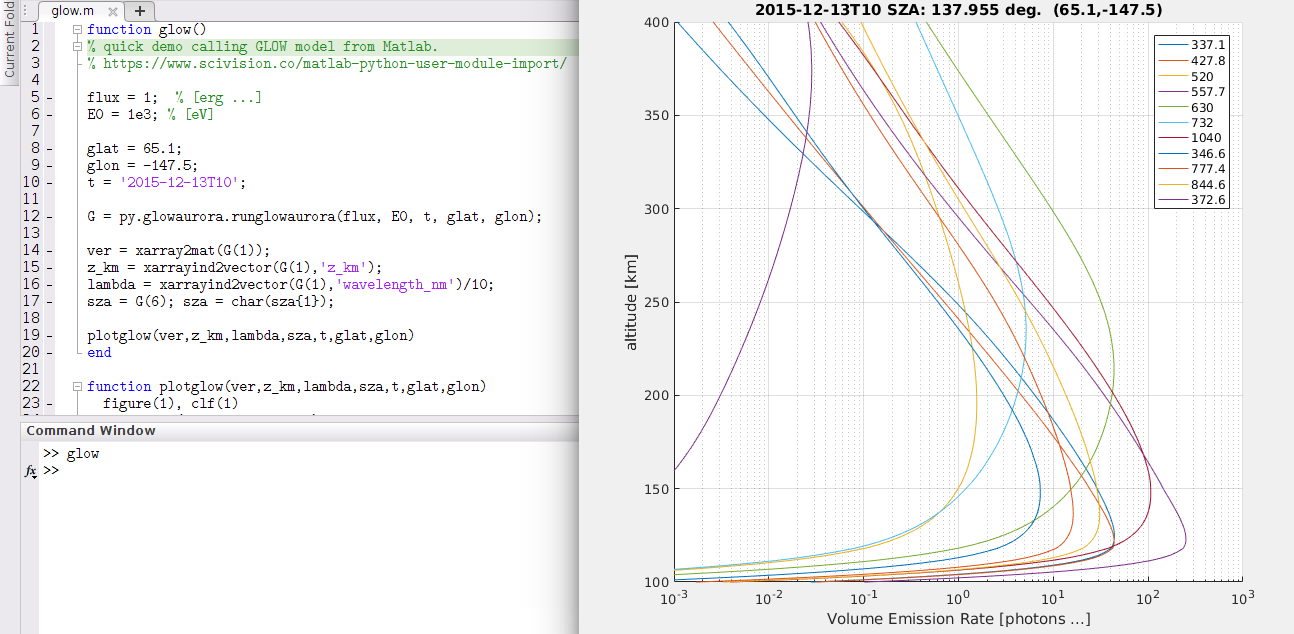
Stan Solomon and the NCAR team have greatly cleaned up GLOW auroral energy deposition and kinetics model.
The new version number is 0.981, and since it’s mostly to Fortran 90/95 standards,
it’s easier to use and modify, along with being more stable.
Updated GLOW Python/Matlab code is available for new
GLOW 0.981.
The single line IF in both classic and modern Fortran only “captures” the first statement.
If you use a semicolon, the code after the semicolon is always executed!
Fortran 77 had
mod(),
which could output negative numbers.
This is often NOT the behavior you want, as other languages’ mod() functions only output positive numbers.
FFmpeg audio option -f alsa -ac 2 -i hw:1,0 uses -ac 2 for stereo to hardware address 1,0.
For default audio device, use -f alsa -i pulse.
Obtain hardware addresses via arecord -l.
Note that monoaural -ac 1 doesn’t work on some hardware.
-c:a aac -ar 44100 is AAC encode audio at 44.1 kHz sampling frequency (passing audio up to about 22 kHz, CD-quality).
FFmpeg video option -f v4l2 -r 10 -i /dev/video0 say to acquire video from webcam /dev/video0 at 10 fps, using the native resolution of the webcam.
Force webcam resolution like -s 640x480.
-c:v libx264 -pix_fmt yuv420p -preset ultrafast -g 20 -b:v 2500k encodes video using the H.264 video compression algorithm, prioritizing reduced CPU utilization, in blocks of 20 frames with a target bitrate of 2.5 Mbps.
FFmpeg config -threads 0 -bufsize 512k lets FFmpeg choose the number of CPU threads, with a 512kB buffer.
Adjust buffer size as needed–tradeoff between latency and robustness.
-f flv rtmp://a.rtmp.youtube.com/live2/YOURSTREAM &> stream.log uses the FLV container format, live stream to YouTube, with stream ID YOURSTREAM.
Don’t let others know the Stream ID!.
Screenshare: use the same command as above, swapping -f v4l2 -r 10 -i /dev/video0 with
-f x11grab -r 10 -s 1024x720 -i :0.0+0,24
-f x11grab -r 10 -s 1024x720 -i :0.0+0,24 sets screengrab at 10 fps, starting in the upper left hand corner, send a 1024x720 pixel video.
If your screen resolution is more than 1024x720, there would be unsent regions at the bottom and/or right side.
Restream.io has a free basic service that streams to over 30 sites, from a single incoming stream from FFmpeg.
While FFmpeg can “tee” live-stream to multiple sites, this uses N times the data bandwidth for N sites, which doesn’t scale well.
Restream.io takes one incoming stream and sends it to multiple sites, saving the streaming creator’s Internet data bandwidth.
This is useful for slow Internet connections or where Internet connection cost is expensive per gigabyte.
The free service from restream.io works for YouTube Live among others.
restream.io can send stream notifications to the feed.
restream.io sends preview/link to stream
use Titles on restream.io to set stream titles all at once (before stream start)