The “middle mouse button paste” behavior of X11 can lead to posting unwanted text in a document when you’re simply trying to scroll through it.
Disable Linux middle-mouse button paste in Terminal:
xmodmap -pp
Telling the active mouse button function indices. The second number is apparently the middle mouse button function, which we will map to an unused index. Example output of xmodmap -pp:
Edit ~/.Xmodmap - swap the last number with the second number. Keep a backup of your original ~/.Xmodmap file if one existed. For the example above, edit and save:
pointer = 1 10 3 4 5 6 7 8 9 2
Finally, logout / login
the middle-mouse paste should be disabled, while you are still able to use the middle mouse button to scroll.
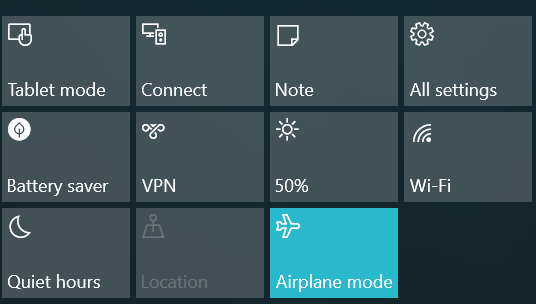
If Windows is set to Airplane Mode, this can prevent your battery from charging while in Airplane Mode, even after reboot or booting into Linux.
The change is persistent even when booting into Linux–perhaps a no-battery-charge flag is set in the UEFI BIOS.
Windows in Airplane Mode prevents battery charging.
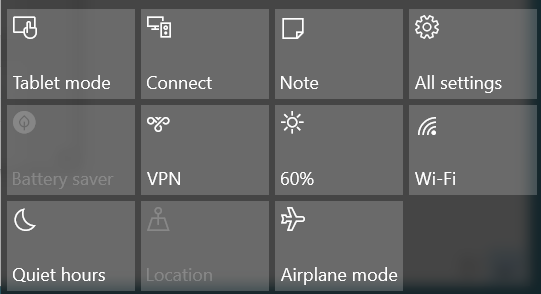
Laptop charge after Airplane Mode: go back into Windows and turn off Airplane Mode to allow charging the battery.
Re-enable battery charging on Windows and Linux--observe Airplane Mode is not highlighted.
The
reason Lenovo gives
for disabling battery charging in Airplane Mode is to avoid tripping the airplane seat power outlet circuit breaker.
Seems fair, but they should have a popup message reminding you of this fact.
The Snapdragon 808 CPU in the Blackberry Priv has a Cat 9 LTE modem on board, and feels quite speedy on LTE or Wifi as compared to the Blackberry Passport, which was hindered by a slower CPU.
BB10 market share has been subsumed by the release of Android-based Blackberry hardware.
The Priv enables carrying just one device for productivity apps, instead of relying on carrying an Android tablet for business productivity apps.
Blackberry Hub+ has been continually improved and gives a better overall experience on Android than BB10.
The Blackberry Android Mosaic task manager is better than the BB10 limit of 6 full size apps.
Pull down on notification banners to expand them into a preview.
Android allows granular app permission setting.
The DTEK app on Blackberry Android hardware allows monitoring utilization of permissions that are allowed.
The BlackBerry Priv camera satisfied in a wide variety of scenarios as compared to Blackberry 10 Passport camera.
2.4 / 5 GHz WiFi performance of the Priv seems very comparable to the Passport.
The Priv keyboard is pretty good.
I prefer the landscape orientation (e.g. Moto Droid 4) instead of portrait, but it was better than I thought it’d be.
I needed a few days to adapt from Passport keyboard.
The Blackberry Priv AMOLED naturally has popping, bright (good) color.
The color temperature can be adjusted, but I didn’t need to adjust it.
Given the great resourcefulness of characters throughout the four Mad Max films in a post-apocalyptic environment, it seems odd that still working satellites, especially
amateur satellites
weren’t exploited.
One may argue that the satellites could have fallen victim to
EMP.
The star fields shown appear to be synthetic, a disappointment as it would have been a great Easter Egg to show the location in say Western Australia.
The production crew spent so much effort on authenticity of set props that it wouldn’t have been so much relative cost to make an accurate (albeit apparently sped up) satellite pass.
A licensed amateur radio operator needs little more than a simple VHF/UHF (144MHz / 430MHz) handheld FM transceiver to communicate through amateur satellites.
One can buy an $90 Arrow antenna and that’s a complete satellite communication system, allowing free communications over most of a continent. For certain higher-orbiting LEO satellites limited intercontinental communications is possible.
Who could Mad Max talk to on the amateur radio satellite?
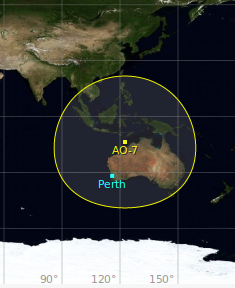
According to Gpredict, and assuming the highly circular ~1450km altitude of AO-7 hadn’t decayed much, and that the very
simple electronics
of AO-7 survived the EMP (if there was a nuclear war in the Mad Max
universe), then AO-7 in it’s VHF/UHF mode would be a good candidate to talk to Indonesia, Papua New Guinea, and of course the whole of Australia from the supposed Western Australia location of the
characters.
Mad Max commsat coverage
Link Budget shouldn’t be an issue, with a rubber duck antenna and 4 Watt satellite, it’s possible now, how much more so when there are very few anthropogenic signals about.
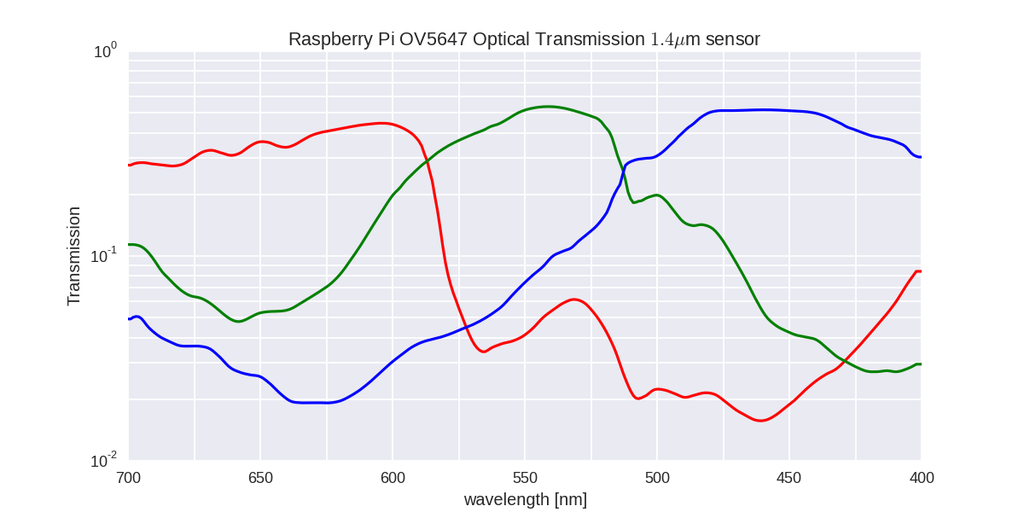
I took the data
digitized from the OV5647 datasheet
by Koen Hufkens and put it into HDF5 format and provided a convenient reading/plotting Python program so that others can use it.
Naturally, individual cameras vary, and the spectral response extends beyond that shown here.
Design of CMOS RFIC
by Thomas Lee. Written in inimitable affable style. Expects knowledge of discrete RF circuits and teaches you how to make ICs. High used price testament to staying power.
Thanks to more great support from the SRI Sondrestrom team and of course NSF, we are once again observing with the amazing Marshall 140mm lens and the Andor Neo sCMOS camera.
This gives up to 8 degree field of view with up to hundreds of frames per second.
We are starting off with white-light (unfiltered) operations, but will soon transition to a “prompt emissions” BG3 filter to avoid the smearing that happens in high-speed auroral video from long-lifetime metastable emissions.
DMC experimental data
collected funded by the National Science Foundation and AFOSR sponsored auroral observation instrument:
Dual-Scale Multi Camera (DMC).
Data is generally sorted into folders by date.
Remember to check +/- 1 day from your desired date if you don’t see the data you’re looking for.
The UTC/UT1 times specified in these files are estimates.
Error in timing may be as large as a minute for data files in the 2012-2013 seasons because the observations were not hardware-timed.
2015-2016 season:
Only the Neo is on site, first installed/focused without BG3 filter on Oct 19 2015, although the filter is available on-site.
2012-2013 season:
The cameras were installed under a flat plate of glass, as a dome caused massive distortions in the narrow field image